Drawliner: A Fresh Font for Creative Designs
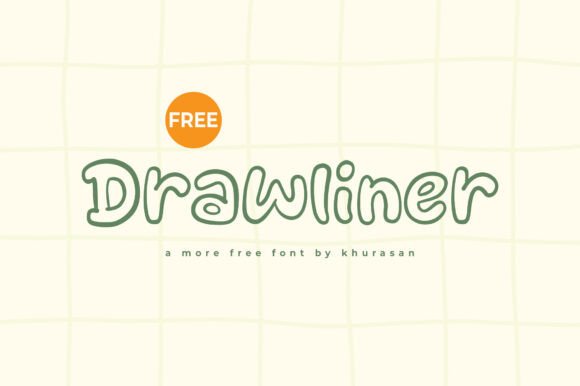
Drawliner is a modern and charming display font that brings a playful yet polished touch to visual projects. With its clean lines and friendly curves, it’s ideal for designers, marketers, and creatives looking to add personality to their work. Whether you're designing a logo, a book cover, or a social media graphic, Drawliner adapts easily to different styles while keeping your message clear and engaging.
What Makes Drawliner Stand Out
At first glance, Drawliner catches the eye with its balanced mix of contemporary and whimsical traits. It’s not too bold, not too soft — just right for a wide range of creative needs. The font’s open spacing and rounded edges give it a warm, approachable feel, making it especially effective for brands or messages that aim to feel friendly and inclusive.
Its design is intentional without being overbearing, allowing it to work well in both print and digital formats. Whether used in a minimalist layout or a more complex composition, Drawliner maintains clarity and visual appeal.
Creative Uses for Drawliner
One of the best things about Drawliner is its versatility. Here are a few ways you can use it to elevate your creative work:
- Logos: Use Drawliner for brand names or taglines that need a touch of warmth and modernity. It pairs well with simple icons or geometric shapes.
- Poster Design: Whether it's for a music event, workshop, or community gathering, Drawliner helps set a welcoming and creative tone.
- Book Covers: Its readability and expressive style make it a great choice for children’s books, lifestyle guides, or creative nonfiction.
- Social Media Graphics: From Instagram stories to Pinterest boards, Drawliner adds a clean yet expressive look to headlines and captions.
Pairing Drawliner with Other Fonts
To keep your designs from looking cluttered, consider pairing Drawliner with more neutral fonts. For example:
- Use Drawliner for headlines and a sans-serif like Open Sans or Lato for body text.
- Combine it with a serif font like Merriweather for contrast in editorial layouts.
- For a minimalist look, pair it with Montserrat or Raleway in clean, modern branding kits.
These combinations help maintain visual balance while letting Drawliner shine where it matters most.
How Different Creatives Can Use Drawliner
Whether you're a small business owner, a blogger, or a freelance designer, Drawliner offers something for everyone. Here's how different users can benefit from this adaptable font:
- Bloggers: Use Drawliner for blog headers or quote graphics to add a personal, handcrafted feel.
- Marketers: Incorporate it into promotional banners or landing page headlines to create a sense of approachability and creativity.
- Educators: Make handouts or presentation slides more engaging by using Drawliner in titles and key points.
- Freelancers: Offer clients a fresh visual identity by integrating Drawliner into logo designs or brand kits.
Design Tips for Using Drawliner Effectively
To get the most out of Drawliner, follow these practical tips:
- Keep it legible: Avoid using it at very small sizes. It works best in headings, titles, and short phrases.
- Use contrast: Pair it with bolder or thinner fonts to create visual interest without confusion.
- Limit color choices: Stick to two or three colors when using Drawliner in logos or banners to maintain clarity.
- Align with brand tone: If your brand is playful or creative, Drawliner fits naturally. For more formal contexts, use it sparingly as an accent font.
Project Ideas to Try with Drawliner
If you're looking for inspiration, here are a few project ideas that make great use of Drawliner:
- Create a set of greeting cards with hand-drawn illustrations and Drawliner typography.
- Design a weekly planner layout using Drawliner for the days and dates.
- Make a series of quote-based Instagram posts with Drawliner as the main text.
- Build a brand identity for a new café or boutique using Drawliner in the logo and packaging design.
These projects not only showcase the font’s flexibility but also encourage you to explore its full visual potential.
Getting Started with Drawliner
Adding Drawliner to your design toolkit is simple. You can find it on most font marketplaces or design platforms that support custom typography. Once downloaded, install it on your computer or import it directly into your design software.
Most design tools like Adobe Illustrator, Canva, Figma, and even Microsoft PowerPoint support Drawliner. Experiment with different weights, colors, and spacing to see how it behaves in various layouts.
Make Your Designs More Expressive with Drawliner
Typography plays a big role in how your audience perceives your message. Drawliner gives you the ability to communicate warmth, creativity, and professionalism all in one font. Whether you're designing for print, web, or social media, it offers a flexible and stylish solution that enhances your visual storytelling.
By understanding how to use Drawliner effectively and creatively, you can bring a fresh perspective to your projects and connect more authentically with your audience. So go ahead — download Drawliner, start experimenting, and see how it transforms your next design.