Brush Designer: A Casual Handwritten Font for Warm and Personal Designs
If you're looking to add a touch of personality and warmth to your design projects, Brush Designer might be the perfect font for you. This casual handwritten typeface is crafted to feel natural and approachable, making it a go-to choice for creatives across industries. Whether you're designing educational materials, personal notes, or creative branding, Brush Designer brings a human touch that resonates with audiences.
Understanding the Style and Aesthetic of Brush Designer
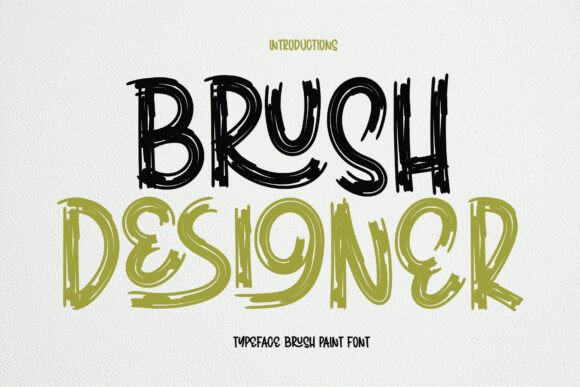
Brush Designer stands out for its smooth strokes and relaxed letterforms that mimic natural handwriting. Unlike rigid, formal fonts, this typeface flows with a sense of ease and spontaneity. Each letter feels like it was penned by hand, giving your designs an authentic and relatable quality. This kind of aesthetic is especially valuable in today's digital world, where users often seek a more human and personal connection.
The font's casual nature doesn't mean it lacks clarity or professionalism. In fact, its balanced weight and open spacing ensure legibility without sacrificing charm. Whether used in digital or print formats, Brush Designer maintains a clean and readable appearance, making it suitable for a variety of applications.
Where Brush Designer Shines: Use Cases and Applications
One of the most compelling features of Brush Designer is its versatility. It's not limited to a single niche or design style. Here are a few common use cases where this font performs exceptionally well:
- Personalized notes and messages – Whether it's a thank-you card, a journal entry, or a handwritten-style email, Brush Designer adds a warm, intimate feel.
- Educational materials – From classroom handouts to children's books, this font helps create a friendly and engaging learning environment.
- Creative branding – Brands aiming for a down-to-earth, approachable image often use Brush Designer in logos, packaging, and promotional content.
- Social media and digital marketing – In a world flooded with digital content, using a handwritten font can help your visuals stand out and feel more personable.
Designers who work on lifestyle, wellness, or artisanal brands often turn to Brush Designer to reflect authenticity and care in their visual identity. It pairs especially well with soft colors, organic shapes, and minimal layouts.
How Brush Designer Fits Into Modern Design Workflows
Modern design tools like Adobe Creative Suite, Figma, Canva, and Procreate support Brush Designer, making it easy to integrate into your creative process. Whether you're a seasoned designer or just starting out, the font's intuitive style means you can quickly apply it to your work without needing extensive typographic knowledge.
For web designers, Brush Designer can be used sparingly in headers, callouts, or interactive elements to add a human touch without compromising readability. When used thoughtfully, it enhances the emotional tone of a website or app, especially in sectors like education, wellness, and lifestyle.
Choosing the Right Context for Brush Designer
While Brush Designer is versatile, it's best suited for contexts where a friendly and informal tone is appropriate. Overusing it in formal or technical documents might dilute the intended professionalism. Here are some tips for using it effectively:
- Pair it with a clean sans-serif – To maintain balance, use Brush Designer for headlines or accents and pair it with a simple sans-serif like Arial or Helvetica for body text.
- Limit its use – Too much of a good thing can be overwhelming. Use Brush Designer strategically to highlight key points or to introduce a personal voice.
- Consider color and background – Light backgrounds with soft color palettes enhance the font's warmth. Avoid using it on busy or high-contrast backgrounds where readability might suffer.
Brush Designer in Branding and Marketing
Brands that want to appear genuine, warm, and community-focused often incorporate Brush Designer into their visual language. It's particularly effective for small businesses, local shops, and service-based brands that want to build trust and familiarity with their audience.
For example, a local bakery might use Brush Designer in their packaging labels and social media posts to evoke a sense of homemade care. Similarly, a yoga instructor promoting wellness retreats could use the font in digital flyers and email newsletters to create a calming and personal tone.
Accessibility and Readability Considerations
While Brush Designer is highly readable in most contexts, it's important to test its legibility at different sizes and on various screens. Avoid using it in very small text blocks or in low-resolution environments where the subtle strokes might become unclear.
For accessibility, always ensure sufficient contrast between the font and the background. If using it on a website, consider offering alternative text styles for users who may need more legible fonts due to visual impairments.
Why Brush Designer Stands Out Among Handwritten Fonts
There are countless handwritten fonts available today, so what makes Brush Designer special? It strikes a balance between authenticity and usability. Many handwritten fonts lean too heavily into the "messy" aesthetic, which can hurt readability. Brush Designer, on the other hand, maintains a consistent rhythm and structure while still feeling spontaneous and personal.
It's also designed with modern design tools in mind, offering compatibility across platforms and devices. Whether you're working on a logo in Illustrator or a Canva poster for Instagram, Brush Designer adapts seamlessly.
Getting Started with Brush Designer
If you're ready to incorporate Brush Designer into your next project, you can find it on most major font marketplaces and design platforms. Many sites offer a free trial version so you can test how it looks in your specific context before committing to a license.
Once installed, experiment with different weights, spacing, and layout combinations. Try using it in both print and digital formats to see where it adds the most value. You might be surprised at how a simple font change can elevate the tone and personality of your work.