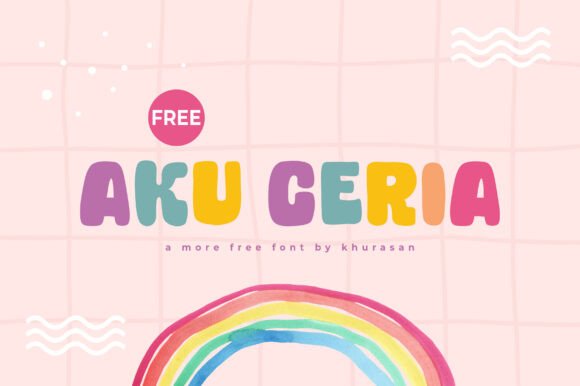
Aku Ceria: A Versatile Font That Adds Charm to Your Designs
When it comes to choosing the right font for a creative project, aesthetics and functionality must go hand in hand. Aku Ceria is a modern and cute display font that’s been gaining attention for its playful yet professional appeal. It's ideal for a wide variety of design applications—from posters and logos to book covers and banners. But while its charm is undeniable, using Aku Ceria effectively requires more than just a quick download and drop into your layout.
Understanding Aku Ceria and Its Appeal
Aku Ceria stands out due to its clean, rounded shapes and friendly character. It brings a sense of warmth and approachability to any visual project, making it especially popular among designers working on branding for children’s products, lifestyle blogs, or boutique businesses. Its modern twist on a classic handwritten style makes it versatile, but that versatility can be misused if not handled thoughtfully.
Many users are drawn to Aku Ceria because of its visual appeal, but they sometimes overlook how context and application affect its performance. Whether you're a beginner or a seasoned designer, understanding the nuances of this font will help you get the most out of it.
1. Using Aku Ceria for Inappropriate Contexts
One of the most frequent misuses of Aku Ceria is applying it in overly formal or technical contexts. Because of its playful appearance, it may not convey the seriousness or professionalism needed for legal documents, corporate reports, or academic materials. This mismatch can lead to a disconnect between the message and the visual tone.
Better approach: Use Aku Ceria for headlines, logos, or short blocks of text where a friendly and inviting tone is desired. Pair it with a more neutral sans-serif or serif font for body text to maintain readability and balance.
2. Ignoring Readability at Small Sizes
Display fonts like Aku Ceria are designed to be eye-catching at larger sizes. However, some users mistakenly use it for small text elements like captions or footnotes. This can result in poor legibility and make the content harder to engage with.
Better approach: Stick to using Aku Ceria for titles and headings. For smaller text, choose a font optimized for readability in those sizes. Always test how the font appears across different devices and screen resolutions before finalizing your design.
3. Overusing the Font Across Design Elements
Another common issue is overuse. Some designers apply Aku Ceria to every text element in a layout, which can make the design feel cluttered and unprofessional. Consistency is important, but so is visual hierarchy.
Better approach: Use Aku Ceria selectively—perhaps for your logo and main headlines—and pair it with a complementary font for secondary text. This creates a balanced visual structure and allows the charm of Aku Ceria to shine without overwhelming the design.
What to Check Before Downloading or Buying Aku Ceria
Before you commit to using Aku Ceria, there are a few practical considerations to keep in mind:
- Licensing: Make sure the license allows for your intended use—especially if you're using it for commercial projects or in client work.
- Character Set: Check if the font includes all the characters you need, such as special symbols, punctuation, or language-specific glyphs.
- File Format: Ensure the font comes in the correct format for your design software (e.g., .otf, .ttf).
- Vendor Reputation: Download from a reputable source to avoid malware or font piracy issues.
Practical Tips for Using Aku Ceria Effectively
Here are some actionable tips to help you integrate Aku Ceria into your projects without falling into common traps:
- Test in Context: Always preview the font in your actual design before finalizing. What looks cute on a sample page may not work in your specific layout.
- Pair Thoughtfully: Combine Aku Ceria with a simpler font to create contrast and maintain readability. Sans-serif fonts like Montserrat or Open Sans often work well as companions.
- Use Kerning and Spacing Wisely: Since Aku Ceria is a display font, adjusting the spacing between letters can significantly impact its visual appeal and legibility.
- Stick to Appropriate Color Contrast: A light pink Aku Ceria headline on a white background may look cute, but it could be hard to read. Always test for accessibility and readability.
When Aku Ceria Is the Right Choice
Despite its limitations, Aku Ceria is an excellent choice when used appropriately. It’s particularly well-suited for:
- Branding for children’s products or educational materials
- Social media graphics and blog headers
- Event posters and invitations
- Branding for small businesses with a playful identity
- Print-on-demand items like greeting cards or t-shirts
When paired with the right visual elements and thoughtful design choices, Aku Ceria can elevate your project from ordinary to memorable.
Final Thoughts
Aku Ceria is more than just a cute font—it’s a design tool that, when used correctly, can bring warmth and personality to your creative work. Avoiding common mistakes like misapplication, poor readability choices, and overuse will help you maximize its potential. Always take the time to test, pair, and adjust the font to suit your specific needs. With a bit of care and attention, Aku Ceria can become a valuable asset in your design toolkit.